
Milan Manager 3.0 Introduces Channels Mode
A New Way to Route Audio
What’s New in 3.0?
Channels Mode: Connect Audio, Not Streams
Routing audio just got dramatically simpler. With the new Channels mode, you simply pick channels on a talker, drag them to one or more listeners, and drop them onto their inputs. Need to route more than one at a time? We’ve got you covered: just hold Ctrl/Cmd or Shift to select several channels at once. Milan Manager then automatically picks the right streams and channel mappings to make the connection work.
Here’s what that means in practice
- Faster setup: route a whole channel group in a single drag, instead of building stream connections and mappings one by one.
- One source, many destinations: send the same channels to several listeners at once, such as feeding multiple amplifiers from one console output.
- Fewer errors: with stream and mapping selection handled automatically, there is less room for mismatched or missing channels.
- Easier onboarding: engineers new to Milan-AVB can start routing audio right away, without first learning how streams and mappings work.
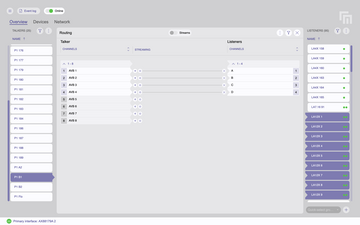
Channels mode is now the default workflow. Prefer the familiar stream matrix? You can switch back at any time from the main menu under Workflow > Streams mode.
Improvements
Better Device Identification
An updated vendor database identifies more switches and devices by vendor, making large networks easier to read at a glance.
Safer Work with Multiple Controllers
Devices locked by another controller, or that Milan Manager cannot register with, are now marked and protected from changes. The Event Log also tells you when other controllers come online or go offline.
Easier Installation on macOS
Milan Manager now runs natively on Apple silicon Macs and no longer asks you to install Rosetta.
Plus: Stability Fixes
We’ve also resolved a number of issues to keep Milan Manager running smoothly, including a crash when saving the network state with no network interface selected, and a Windows issue that could prevent Milan Manager from restarting after it was closed.
Milan Manager 3.0 is all about making network orchestration faster, safer, and more intuitive. Whether you’re routing a festival main stage or configuring a permanent installation, Channels mode lets you focus on the audio rather than the streams behind it.
Ready to Upgrade?
Milan Manager 3.0 is available now from www.milanmanager.com and through the in-app auto-update functionality. As always, Milan Manager remains free to use. We’re listening, so keep the feedback coming!